
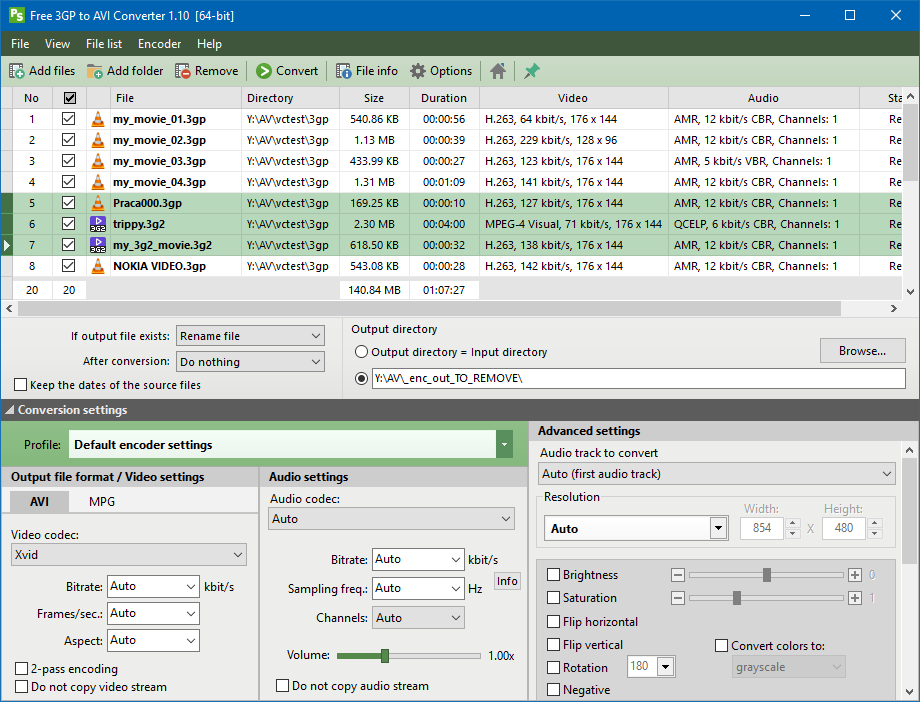
Free 3GP to AVI Converter is the free program which converts mobile phone video files (3GP and 3G2) to AVI or MPEG format. AVI files generated by the program can be played on most portable players.
Download
Description
Version 1.10 of the program is probably the last version running on Windows XP. Compatibility with Windows XP blocks access to many technologies, audio and video encoders, and FFmpeg functionalities available only for Windows Vista and newer.
Free 3GP to AVI Converter is the freeware application which convert mobile phone video files (3GP, 3GPP and 3G2) into AVI or MPG (MPEG-1, MPEG-2).
3GP and 3G2 files are commonly used in the modern mobile phones, but they are not supported by Windows Media Player and other popular media players. To display 3GP/3G2 video you need to convert that file into more reliable format, such as AVI or MPG.
The converted video files can be imported into Windows Movie Maker or other video tool.
The application allows you to set many parameters used by encoder: audio and video codec, audio and video bitrate, fps, sampling frequency, resolution, volume and other.
The Free 3GP to AVI Converter interface is a very simple and user-friendly. To convert 3GP video files, just drag & drop them into main window and click the button.
At default settings, the application converts files using Xvid video encoder and MP3 audio encoder, and automatically selects all the encoding parameters so as to preserve the original video and audio quality.
Most portable and fixed players should have no problems playing AVI files created with these settings.
The program is available in both 32 bit and 64 bit version. The conversion process of the 64-bit version is faster by a few to 25% (depending on the selected video encoder) compared to the 32-bit version.
Screenshots
The most important features
- Conversion from 3GP and 3G2 to AVI or MPG.
- Limited support for other video formats (including AVI, MKV, WMV, MP4, FLV, MTS, OGM, AMV).
- Decoding the most important audio and video codecs used in 3GP/3G2 files: MPEG-4, H.263, AVC/H.264, AMR-NB, AMR-WB, AAC etc.
- Supported video encoders: XviD, DivX 3, H.264, WMV, MPEG4-FFmpeg, S-Mpeg 4 v. 2, Motion JPEG (MJPEG), HuffYUV, MPEG-1, MPEG-2.
- Supported audio encoders: Lame (MP3), MP2, AC3, AAC, WMA, PCM 16-bit.
- Support for multithreaded encoding using the H.264 (x264) encoder.
- Generating video files compatible with the MPEG-1 / MPEG-2 standard.
- A number of predefined conversion profiles. Possibility to save your own settings to an INI file.
- A large number of encoding parameters: audio and video bitrate, fps, number of channels and audio sampling, the volume, change the resolution, scaling and cropping the image, and others.
- Possibility of 2-pass encoding, which will increase the image quality and reduces the volume of output file.
- The ability to save the FFmpeg encoder commands in a BAT file.
- The program is portable: it does not use system registry and all settings are stored in INI files. Thanks to this program can be run from portable devices such as pendrives, removable drives.
- The program has a built-in support for multiple languages. Current version supports Chinese (simplified), Czech, English, Finnish, French, German, Greek, Hungarian, Italian, Japanese, Latvian, Polish, Portuguese (BR) Russian, Serbian, Spanish, Swedish, Turkish.
- 100% freeware! – for private and commercial use. The program does not require registration, there is no built-in limitations and spyware applications, does not add to the generated files “watermarks”, etc.
How to uninstall?
- Open Programs and Features by clicking the Start button, clicking Control Panel, clicking Programs, and then clicking Programs and Features.
- On the list of installed programs select Free 3GP to AVI Converter and then click Uninstall. This will launch the uninstall wizard.
- Follow the instructions displayed on the screen.
End User License Agreement
3rd party software
To encode the video files the program uses the FFmpeg encoder (ffmpeg.org).
To retrieve information about video files, the program uses the library MediaInfo.dll (http://mediainfo.sourceforge.net/).
The program is accompanied by a special version of the FFmpeg encoder, adapted to the needs of the program. Not recommended to use other versions of FFmpeg.
Changelog
Version 1.10 (2018.07.19)
- New conversion engine (FFmpeg) and multimedia information library (MediaInfo).
- New module: Check for updates.
- Added option to save the creation, last access and last write time of the source files in the output files.
- New video filters: color conversion to grayscale or sepia, brightness, saturation, flip horizontal, flip vertical, rotation, negative.
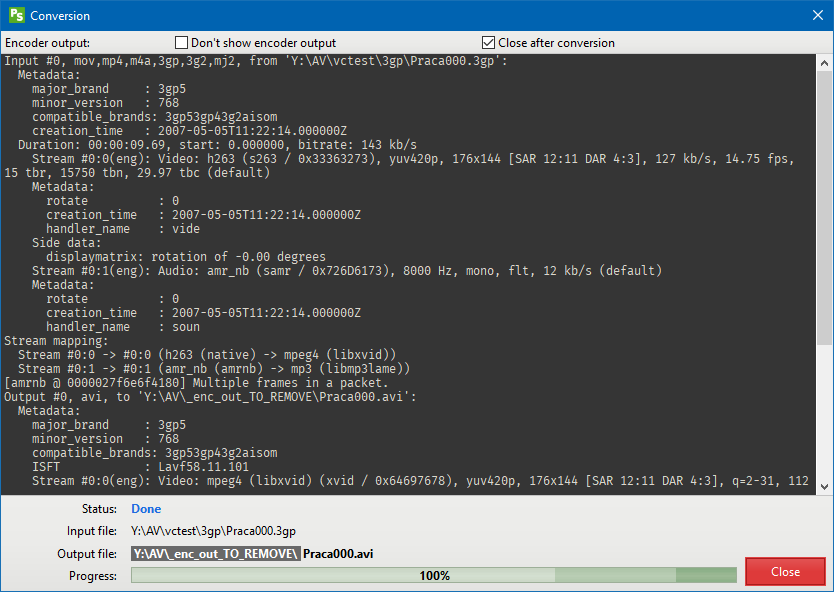
- Displaying the size of the resulting file during conversion.
- Highlighting the conversion speed and highlighting the number of the current pass during two-pass conversion.
- A new control displaying a list of pre-defined video resolutions. All resolutions that meet the 16:9 aspect ratio are highlighted in green, 4:3 – light red. The list has also been complemented with slightly less used resolutions.
- The control displaying the list of profiles has been changed. Now additional separators are displayed between the profiles, which increases the readability.
- Changed the position and size of some interface elements, mainly related to facilitating access to advanced program options.
- A small changes to many controls: file list (table), buttons, audio volume slider, menus, some panels…
- Added the ability to select visible columns from the context menu of the file list and from the main menu.
- The error causing displaying of negative values of processed data after exceeding the 2GB threshold has been fixed.
- Automatic scrolling of text in the window with the conversion progress.
- Lots of smaller improvements and bug fixes.
Version 1.9 (2017.05.12)
- New conversion engine (FFmpeg) and multimedia information library (MediaInfo).
- Restored compatibility with Windows XP.
- Changes in the program interface: modified toolbar and menus.
- New window: Tools Info
- Bug fixes and enhancements.
- Program name was changed from Pazera Free 3GP to AVI Converter to Free 3GP to AVI Converter.
Version 1.8 (2016.08.26)
- From now the program is also available in a 64-bit version.
- New conversion engine (FFmpeg) and multimedia information library (MediaInfo).
- New columns: video codec, video codec ID, video profile, video bitrate, width, height, resolution, display aspect, frames/sec., scan type, bits/pixel, video stream size, audio codec, audio codec ID, audio profile, audio bitrate, channels, sampling, audio stream size.
- New actions: Uncheck all files, Check selected files, Uncheck selected files, Clear file list.
- The default video encoder was changed from H.264 to Xvid, which is more “native” to AVI files.
- Added support for Swedish language.
- Minor bug fixes and enhancements.
Version 1.7 (2016.06.20)
- New conversion engine (FFmpeg) and multimedia information library (MediaInfo).
- New file list control with many additional features (sorting, row and column moving…).
- Possibility to set the default video encoder by the user.
- Better support for 3GP video files.
- Changed toolbar.
- New icons.
- Added support for additional languages: Chinese (simplified), Finnish, Hungarian, Russian.
Version 1.6 (2014.06.02)
- Changes in the program interface (toolbar, profile list, file list).
- Added ability to set the number of encoding threads using the x264 encoder.
- New version of the FFmpeg and MediaInfo library.
- Fixed saving audio codec ID when converting audio to AC3 and AAC.
- Adding to the processing list of all supported files from the selected folder and its subfolders.
- Improved detection of data streams in video files.
- Improved reading and writing of encoder parameters from/to profiles.
- Closing the window with the conversion progress at the end of the conversion process.
- Improved reading and writing of encoder parameters from/to profiles.
- New conversion profiles.
- Added support for additional languages: Greek, Latvian, Portuguese, Serbian, Turkish.
- Improved matching of encoding parameters with automatic settings.
Version 1.5 (2013.03.26)
- New version of the FFmpeg that supports the latest versions of the x264, LAME, XviD and other encoders.
- New version of the MediaInfo library.
- Improved matching of encoding parameters with automatic settings.
- Improved detection of data streams in video files.
- Improved interrupting the conversion process.
- Saving and restoring size of the window with the progress of the conversion.
- Added support for languages: Czech, French, German, Italian, Spanish.
Version 1.4 (2011.11.01)
- New version of the FFmpeg encoder.
- A much improved matching of encoding parameters with automatic settings.
- From now the program is distributed in the form of the installer.
- Support for new versions of the XviD, LAME, and H.264 (x264) encoders.
- Added support for multithreaded encoding using the H.264 encoder.
- Added support for all major video formats (including AVI, MKV, WMV, MP4, FLV, MTS, OGM, AMV). However, FFmpeg encoder was compiled with the parameters chosen for decoding audio and video streams used in 3GP files, so support for other formats is not complete.
- Added the ability to deinterlace video.
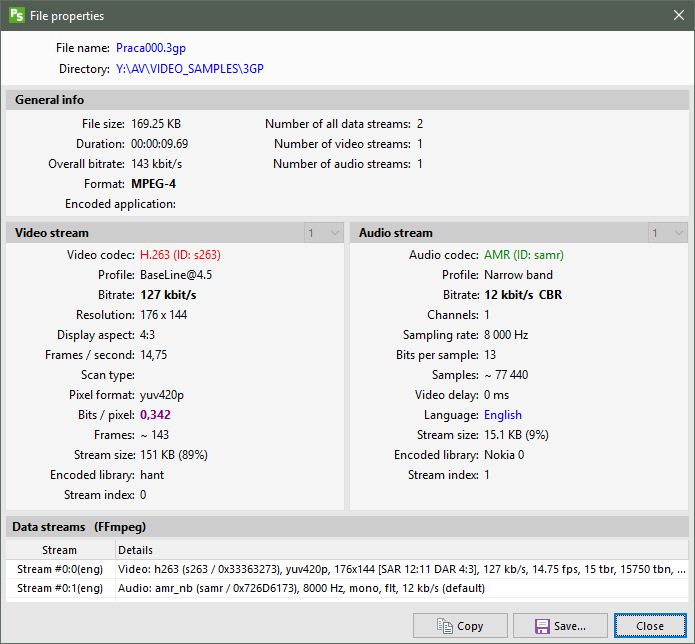
- Through the use of library MediaInfo.dll, the program displays very detailed information about the selected video file.
- Added mechanism to support multiple languages.
- Numerous modifications to the source code and bug fixes.
Version 1.3 (2009.04.05)
- New version of the FFmpeg encoder.
- Support for XP visual styles.
- Minor of modifications to the source code and bug fixes.
Version 1.2 (2008.08.28)
- New version of the FFmpeg encoder.
- Volume control.
- List of profiles.
- New video codec – HuffYUV.
- New audio codec – PCM 16-bit.
- Copying the original audio and video streams.
- Support for additional FFmpeg command line parameters.
- From now the program does not use the system registry.
- A number of modifications to the source code and bug fixes.
Version 1.1 (2008.01.09)
- New version of the FFmpeg encoder.
- Menu View.
- Video file properties dialog.
- Improved stability.
- A number of modifications to the source code and bug fixes.
Version 1.0 (2007.12.10)
Initial release.